EngageBeat explained
Try it free for 28 days.
Get to know EngageBeat in everyday work. Here you can learn how to prepare, when the trial starts and what applies afterwards.

Try free for 28 days — with up to three teams. Can be ended at any time during the trial.
All termsYour path to starting the trial
- Get setup linkChoose the number of teams, plan and payment frequency, and enter your contact details. Preparation is free; neither a subscription nor the trial period starts yet.
- Set up companyUse the personal link in your email to add company and billing details. A conversation is optional. For multiple teams too, the link takes you directly to setup.
- Prepare teamsYou can create teams and assign the people responsible now or later. Organisational units are optional and not needed for normal team setup. Invited leads set up their area. Clarify agreements, data protection and internal requirements before use.
- Confirm the startA company admin reviews the teams, prices, terms and trial conditions in the web app under ‘Review start and pricing’. Only then do they confirm the binding booking and approve the start. The 28 days begin when the first survey opens. Setup and preparation do not count towards this period. The confirmation states the trial start, trial end and date charges begin.
The demo and consultation are optional.
Organisation-wide reporting during the trial
Organisation-wide reporting is available at no extra charge for 3 or more teams in EngageBeat Team, EngageBeat Fokus and EngageBeat Enterprise and is set up optionally.
Up to three teams can try it for free. They must start on the company’s first shared start date. If exactly three teams start together and organisation-wide reporting is set up, you can try it during the trial.
Values appear after the week closes for each question only if all three teams meet the release requirements and each has at least five valid responses. Otherwise, the metric remains hidden for that week. Additional protection rules may also prevent it from being displayed. Comments and individual team values are not shown.
Clarify access, protection rules and participation rights before starting.
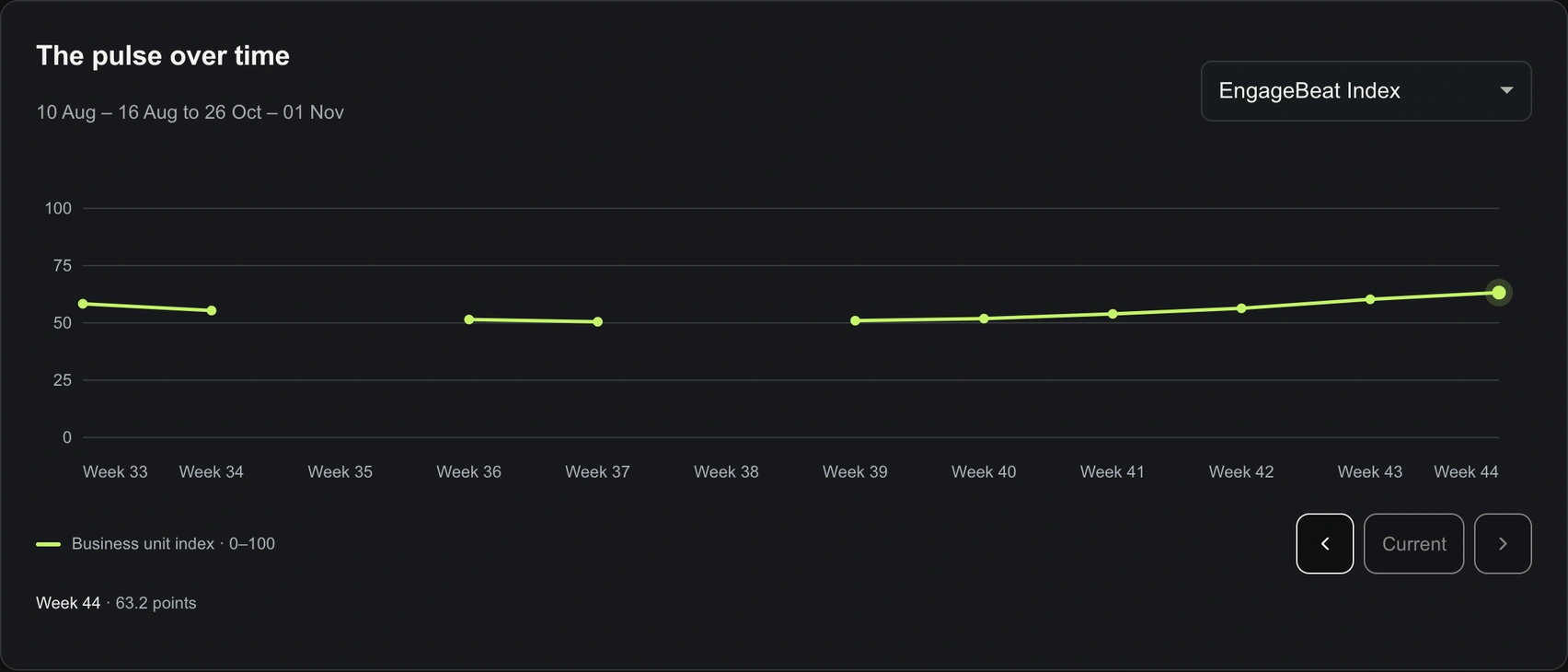
A look at the organisation demo with six fictional teams: aggregate values complement the individual team areas. During the free trial, the conditions described above apply to up to three teams.
Introduce multiple teams at your own pace
Provide the exact planned number when registering. Then add your company and billing details and create your teams with their respective people responsible. You can also add teams later. Organisational units are optional and are not needed for standard team setup. Preparation does not use up any trial days.
One shared first start date, up to three trial teams: Up to three teams each receive 28 free days if they start on the company’s first actual start date (Europe/Berlin time zone). Unused trial places expire for later starts. Additional teams start only after an explicit paid booking. After setup is complete, a company admin reviews the teams and costs in the web app under “Review start and prices”. Only then do they confirm the booking and approve the start.
Discounts apply only to teams that have actually started: Planned and prepared teams do not count. Teams count as started once their first survey has actually opened and their contract has not yet ended. Trial teams count too. The regular price per team applies for one to five teams. For six to ten teams, lower tiered prices apply to all teams from their respective next billing period. For new contracts, the tier reached applies from the first paid period. If the number decreases, the corresponding tier likewise applies only from the next period. Periods already paid for are not changed retrospectively.
For an annual contract, the next period is the next contract year. Cancellation ends it at the agreed end of the term; simply not using it does not end a contract. For eleven or more teams, we agree price and scope individually. View tiered prices.
Start well prepared
This checklist helps you coordinate internally. Preparations take place before the confirmed trial start.
What you receive from us
- Terms and conditions and information about protection measures and access limits and data protection and service providers are already publicly available.
- Web app privacy notices ↗ explain the technical processing. They support your participant information and do not replace your own information.
- Invitation and reminder templates below for you to use; after setup, they are also available to copy in the team area.
- A personal setup link and an access guide. For questions, Sven can help at hello@engagebeat.de.
- The pilot guide as a PDF with preparation and discussion support.
We will clarify personally before the start which contractual and data processing documents you need for your use. Public notices do not replace a required agreement.
What you prepare
- Define the team, survey purpose and responsible team owner. Plan for at least five people per team. The price per team stays the same when more people join. Before starting, we check whether the team is eligible for the free trial.
- Clarify data protection, authorised admins and deletion periods internally; complete any required Works council involvement before use.
- Inform participants: add the purpose, those responsible within the company, legal basis, access rights, retention and contact details.
- Share participant access securely. The owner password stays with the responsible person.
- Plan a regular time for team discussions and decide who will manage invitations and reminders.
What the team leader takes on
The advertised minute refers to a participant’s short check-in without a longer comment. It is not a promise about the team leader’s total time commitment.
- One-off preparation: clarify internal requirements, set up access, secure passwords, review questions and retention, and inform the team.
- Inviting participants: Adapt the template and, after the start is approved, share the team access details through your agreed channel; send the password separately.
- Weekly support: send reminders through your agreed channel if needed, review the available results after the week closes and prepare a specific improvement action.
- Discuss together: interpret observations, agree a small change and return to it later.
Recommendation: Initially reserve 15 minutes in your existing team meeting to discuss results. This is a planning aid from the guide, not a measured total duration. Setup, internal coordination, reminders and discussion preparation are additional; the effort involved depends on your circumstances.

A discussion prompt from the demo tour: a topic that stands out becomes a specific next step, which you return to in the next review.
The simple way: copy the prepared invitation text. After the start is approved, share it and the participant access details yourself through your agreed channel. You do not need to add email recipients for this. Preparation and copying do not send a participant invitation or start a trial.
Automatic email reminders are optional. To use them, add a team mailing list or individual recipients, choose the weekly schedule and deliberately activate sending. Addresses are not linked to responses. You can change or pause reminders later. A Teams integration is not included. Contract messages before charging begins are sent separately to the responsible person.
From the setup link to the right area
After registration, sending your personal setup link starts automatically. It arrives by email; delivery may take a little time. If you already have confirmed access, the message takes you to your personal management area. First add your company and billing details and set up your personal management access. You can create teams and assign their owners now or later. Organisational units are not needed for this; they are an optional extension if you want to group several teams organisationally.
Invited team owners receive their own access to set up their team. If you also use organisational units, this applies to their owners too. A person with several responsibilities uses one personal account for them. Questions, retention and participant access are prepared per team; automatic reminders remain optional.
Your personal management password stays with you. Shared participant access is separate; it only allows participation in the team check-in. Names and email addresses optionally added to the invitation list are not employee accounts and are not linked to responses. For questions, contact hello@engagebeat.de.
Invitation and reminder texts to use
Before sharing, complete all details in square brackets and add your internal participant information. These texts are communication aids, not complete privacy information. Please do not enter real access credentials on this page.
Show invitation template
Show reminder template
Preparing and copying does not send anything. You share the invitation and reminder yourself.
The actual survey start is what counts
You try your selected plan: EngageBeat Team with standard questions, or EngageBeat Fokus with additional custom questions and topic packs. The price applies to one team of at least five people and stays the same when more people join. For eleven or more teams, or for personal support, we agree price, trial scope and support individually.
The 28 days begin when the first survey opens. Setup and preparation do not count towards this period.
After preparation, a company admin reviews the selected teams and terms in the web app under ‘Review start and pricing’. Only their explicit booking and approval enable the start. The confirmation states the start, end and date charges begin, and is also sent by email. Registration and creating a team alone start neither the trial period nor a subscription.
Surveys follow calendar weeks from Monday to Sunday (Europe/Berlin). Starting midweek and ending after 28 days can produce partial weeks. The trial therefore does not necessarily consist only of complete survey weeks.
Final survey and results
If you continue on the booked subscription, surveys continue beyond the trial end. If you cancel before the trial ends, responses are possible only until the confirmed trial end. The final survey week that has started closes on the following Monday. Only then can its analysis become available, provided there are at least five valid responses per question.
Only authorised team owners see the results. The minimum threshold applies to each question. Afterwards, discuss a topic that stands out and a specific next step with the team.
Change plan during the trial
You can explicitly change your plan selection during the trial. New weekly check-ins then use the chosen plan; the week already in progress remains unchanged. The change does not extend the trial or start a new one. Before confirmation, the web app shows the subsequent plan, price, payment frequency and charging start date.
As a rule, we send reminders seven and two days before charging begins. If one of these points has already been reached when you change plans, you explicitly confirm which earlier price notice is replaced by the new agreement. Any outstanding reminders state the new price. If the required confirmation or a reminder that has not been replaced is not sent, the transition to a paid subscription remains on hold.
For multiple teams, a company admin sets the payment frequency and whether the plan is selected jointly or per team. Current paid contracts retain their individual periods. Rules for plan changes and billing.
What happens after the trial
After the 28 free days, your chosen EngageBeat Team or EngageBeat Fokus plan automatically continues on a paid basis unless you cancel beforehand. As a rule, we email the person responsible seven and two days before charges begin, with the date, price and cancellation option. In the event of an expressly confirmed plan change, the new agreement may replace a price notice already due; details are under ‘Change plan during the trial’. If you cancel before the trial ends, no subscription charges arise. The agreed period of 30 days applies to retrieval and data return after the contract ends; hello@engagebeat.de can help if needed.
The selected billing begins only after the free trial period. You can cancel before it ends by emailing hello@engagebeat.de. With monthly payment, the term is one month; with annual payment, it is twelve months, paid in advance. All prices exclude statutory VAT. The amounts are listed in the plan overview; the contractual terms are in the Terms and conditions.
Is EngageBeat right for your team?
Choose EngageBeat Team for everyday teamwork or EngageBeat Fokus for custom questions and change initiatives.
Try free for 28 days — with up to three teams. Can be ended at any time during the trial.
All terms